
Skip to content
Skip to product information
1 of 7

Multi-Function Control Panel Dual Screen Controller Automation Panel 6"

Regular price ₹ 45,000.00
Regular price ₹ 60,000.00 Sale price ₹ 45,000.00
Sale Sold out
Buy Multi-Function Control Panel Dual Screen Controller – control all smart devices from one 6 inch screen. Touch, app, and voice ready.

Save more with a package

Save upto 40% when you buy a package instead of individual products


How Does It Work?

Okos Smart Multi- Function Control Panel Dual Screen Controller Automation Panel 6" make your home Smarter. Compatible with 2 Gang Indian Wall Boxes, simple in wall installation.6-inch HD LCD Screen for crisp and clear display. Intelligent lighting adjustment- Easily adjust the lighting of your whole house, whether it is brightness or color tone, can be achieved through this touch screen. Remote control by Okos Smart app - Want more convenience? App control: No matter where you are, you can control your home appliances with just a few clicks, so you can feel the comfortable & relaxing.

Controller from Anywhere

Brilliant touchscreen panels with built-in Okos Smart App make it easy for everyone at home to control popular smart devices, lighting, locks, thermostats, scenes and more by simply.Okos Smart Multi- Function Control Panel 6" is an all in one Smart Home Control Product.It Can Control Smart Switches, Smart Curtains, Smart Light, Smart Security Cameras, Video door bells Scenes, sensor & all othet smart home devices.


Limitless Uses

Okos Smart Multi- Function Control Panel 6" Make your home smarter.You can set up different scenes and let different smart home appliances match your life. You no longer need to look for remote controls for air conditioners everywhere, and you don’t need to use many switches. You only need to tap when you enter the door, and a romantic dinner will be accompanied. With just the right warm light, soothing music will appear immediately.

Simple Installation

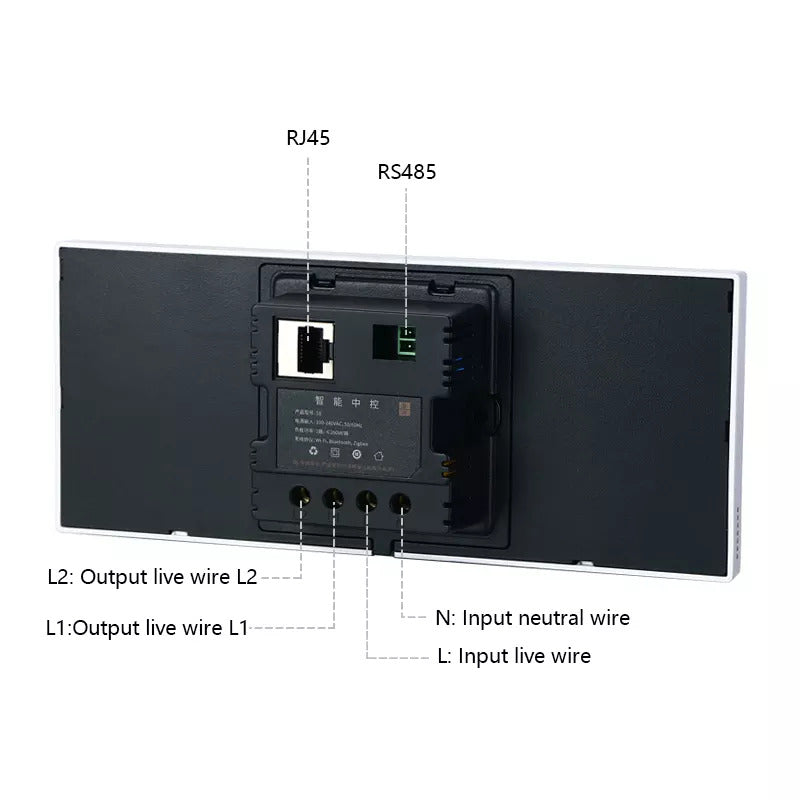
Turn off the main power in the electricity box and confirm the fire wire is not alive with a test pencil.Remove the base of the Smart Switch and install it in the wall boxCheck the wires & make sure the wires are in good contact with terminals & no exposed copper wire.fasten the base to the wall box with mounting screws & fix the smart switch back to the base.This allows for the option of controlling your smart products using the Okos Smart App.

1 year warranty against any manufacturing defects.

FAQs

Can I control all my smart home devices from the 6" Control Panel?

Yes. The 6" Control Panel allows you to control compatible OKOS smart devices such as lights, fans, curtains, smart locks, appliances, and automation scenes from a single interface.

Can the 6" Control Panel be paired with the OKOS Smart App?

Yes. The panel can be paired with the OKOS Smart App, allowing you to control and monitor your smart home from both the panel and your smartphone.

Does the 6" Control Panel support voice assistants?

Yes. Devices connected through the OKOS Smart App can also be controlled using supported voice assistants.

Can I create scenes and automation using the 6" Control Panel?

Yes. You can create custom scenes and automation routines to control multiple smart devices with a single touch or automatically based on schedules and conditions.

Will the 6" Control Panel work if the internet connection is lost?

Yes. Devices can still be controlled locally from the panel. However, remote access, mobile app control, and cloud-based services will not be available until the internet connection is restored.

Does the 6" Control Panel have a built-in Zigbee Gateway?

Selected models include a built-in Zigbee Gateway, allowing compatible Zigbee devices to connect directly without requiring a separate gateway.

Is the screen bright enough for daylight use?

Yes. The display is designed to provide clear visibility even in well-lit rooms and daylight conditions, making it easy to operate throughout the day.

What should I do if a device is not responding from the 6" Control Panel?

Ensure the device is powered on, connected to the same OKOS account, and online. For Zigbee devices, verify they are connected to the panel's built-in Zigbee Gateway or a compatible gateway.

How do I reset the 6" Control Panel?

Open the panel settings and select the factory reset option. After the reset, pair the panel with the OKOS Smart App again and reconfigure your devices if required.

Your cart is empty

Continue shopping